



Using U for consumption, a step-by-step guide to registering and using the SafePal Mastercard

 USDC (Arbitrum) recharge, applicable for both online and offline daily consumption scenarios, with minimal actual wear and tear.
Written by: Tyler
As an established wallet project that received investment from Binance as early as 2018, SafePal has opened a closed beta for a Mastercard issued in collaboration with Swiss Fiat 24 Bank to domestic users. Users can complete the application for a personal Swiss bank account and co-branded Mastercard directly within the SafePal APP.
This Mastercard supports direct recharging with the stablecoin USDC (Arbitrum) and can be linked to Alipay and WeChat for offline/online daily spending in China. It can also be used for subscription services on popular overseas platforms like Twitter and Telegram.
1. Introduction to SafePal and Mastercard
1. What is a SafePal Bank Account and Mastercard?
SafePal is the earliest hardware wallet project incubated by Binance and is currently the only wallet project that has received its investment and appeared on Launchpad. It has now expanded into a full-stack wallet brand covering hardware wallets (S 1, S 1 Pro, and X 1), software wallets, browser extension wallets, and compliant banking services.
SafePal has deeply integrated the compliant financial services of Swiss Fiat 24, allowing users to establish personal bank accounts. Fiat 24 is operated by the Swedish registered company SR Saphirstein AG (CHE-256.014.995) and has obtained a fintech company license under Article 1b of the Swiss Banking Law, regulated by the Swiss Financial Market Supervisory Authority (FINMA). Users can check Fiat 24's licensing records on the FINMA official website to ensure the legality and security of its financial services.
Currently, SafePal's banking services are mainly divided into two parts: Swiss bank accounts (available globally) and co-branded Mastercard (initially opened to domestic users):
- Swiss Bank Account (Fiat 24 Bank Account): Each user will receive an independent Swiss IBAN account, supporting conventional banking services such as fiat deposits and withdrawals, bank remittances, and currency exchanges, similar to Bank of China, Agricultural Bank of China, and China Construction Bank;
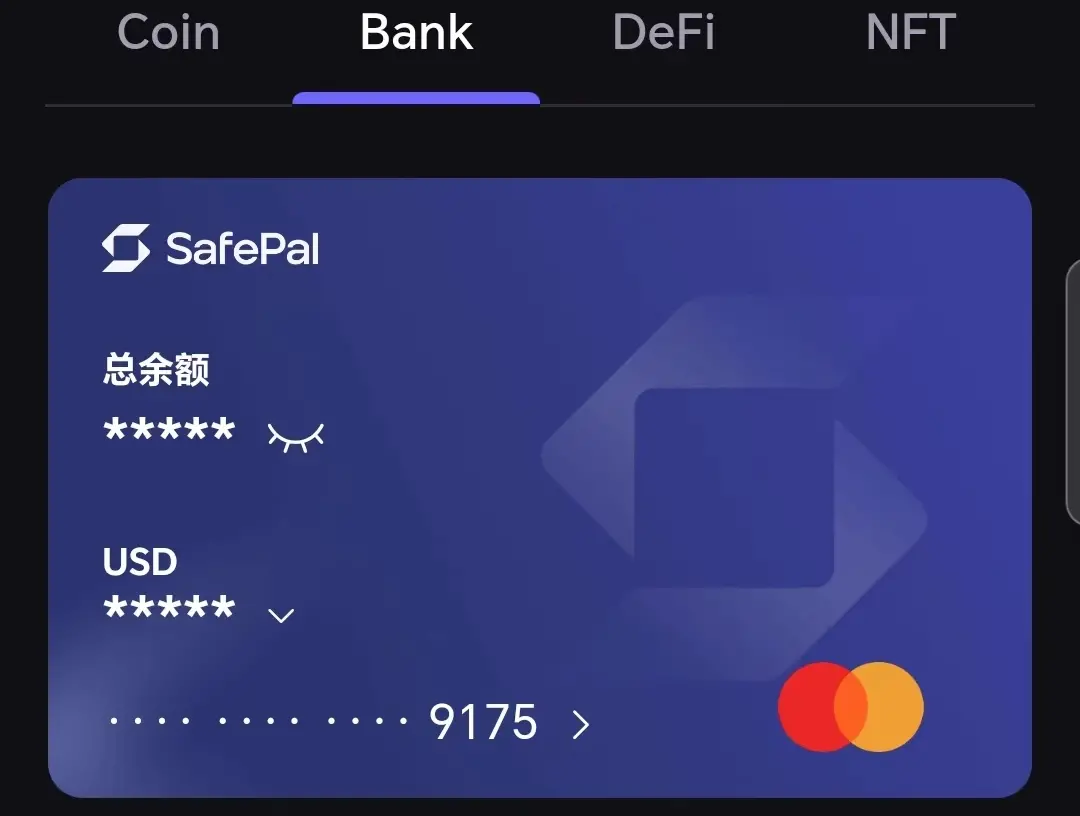
- Co-branded Mastercard (Virtual Savings Card): A 16-digit Mastercard that can be uniformly used outside the EU, which can be linked to Alipay/WeChat for online/offline spending, initially opened to domestic regions;
2. SafePal Mastercard Usage Scenarios
For domestic users, in the past, if they wanted to convert cryptocurrency into fiat for daily spending or purchase overseas services that do not support Chinese bank cards, there were certain barriers and compliance issues. However, with the SafePal Mastercard service, users can have a compliant Swiss bank account without leaving home, directly linking it to Alipay and WeChat for daily spending in offline/online scenarios:
- Online includes mainstream e-commerce platforms such as Taobao, Meituan, JD.com, and Pinduoduo;
- Offline includes merchant QR codes, personal QR codes, etc.;
Currently, PayPal, Apple Pay, Google Pay, Samsung Pay, etc., are not supported, but will be gradually opened in the future.

The recharge fee for the SafePal Mastercard is 0.6% - 1%, and it is currently in a free promotional period. The official statement indicates that future activities will also be free for a long time. The currency exchange fee of 1% can be avoided by opening USD/RMB/EUR/CHF accounts and spending the corresponding currency: for example, using the RMB account for domestic spending and opening accounts in USD for GPT and Twitter memberships, thus avoiding the 1% currency exchange fee.
The transaction limit for SafePal bank accounts (remittances, currency exchanges, spending) in domestic regions is 100,000 USD/month; if linked to Alipay/WeChat for daily spending (each has its own limits for international cards):
- WeChat is 3,000 RMB/transaction, 3,000 RMB/day, 15,000 RMB/year;
- Alipay has a minimum single payment limit of 0.1 RMB, a maximum single payment limit of 3,000 RMB, and an annual cumulative payment amount not exceeding the equivalent of 10,000 USD (approximately 70,000 RMB).
It is worth noting that a 3% handling fee will be charged for Mastercard transactions over 200 RMB, which is a unified rule for all international cards (within 200 RMB, WeChat and Alipay subsidize the handling fee).
Compared to other crypto U cards currently on the market, the differences and advantages of the SafePal Mastercard include:
- Low registration threshold: No complicated processes are required; users can easily register for a Swiss bank account and apply for a Mastercard within the SafePal wallet APP.
- Binding wallet address: No use of phone numbers or emails; completely uses on-chain wallet addresses. When applying for an account, the bank will mint an NFT for the user, and holding this NFT in the user's wallet represents ownership of the bank account;
- Convenient online and offline spending: By linking to Alipay and WeChat, users can conveniently spend on mainstream platforms like Taobao, Meituan, JD.com, and Pinduoduo, as well as offline merchant QR codes and personal QR codes.
- Multi-currency accounts, no currency exchange fees: Supports four currencies: USD/RMB/EUR/CHF, allowing users to open USD/RMB/EUR/CHF accounts and recharge funds without currency exchange fees for spending in these currencies;
- Regulated compliant bank accounts: The bank accounts created by users in SafePal are actually personal bank accounts under Swiss Fiat 24 Bank, with independent IBANs, ensuring higher fund security and operational transparency (fully traceable on-chain, as detailed below). In contrast, other crypto U cards often only provide prepaid cards or assets managed by issuing institutions, making potential risks and compliance issues difficult to assess, with third-party intermediary risks;
- Daily banking business functions: SafePal Bank has the same basic business capabilities as conventional banks, allowing not only for overseas spending and payment of international service fees but also for daily banking operations, providing a convenient channel for users' fund circulation and cross-border payments;

Note: Bank account transactions require Gas (Arbitrum network), while Mastercard spending does not.
2. SafePal Mastercard Account Opening/Application Guide
Since both the SafePal bank account and Mastercard services are within the SafePal wallet APP, users must first download the SafePal wallet APP (it can be used with or without a SafePal hardware wallet) and operate entirely within the SafePal APP.
The Mastercard can only be applied for after completing the bank account opening, and users need to prepare their personal ID or passport in advance (Android users can use ID, while Apple users are advised to use a passport).
Note: It must be version v4.8.3 or above; the APP can be downloaded from the official website (iOS, Google Play, Android APK).
1. Opening a SafePal Bank Account
After successfully downloading and installing the SafePal wallet APP, open the APP, click on the "Bank" option at the top, and then click "Start."

Then click "I have an invitation code" at the bottom, enter the closed beta invitation code "244274," and click next to successfully create the bank account. Then click "Go to Fiat 24 Registration" to enter the registration page.

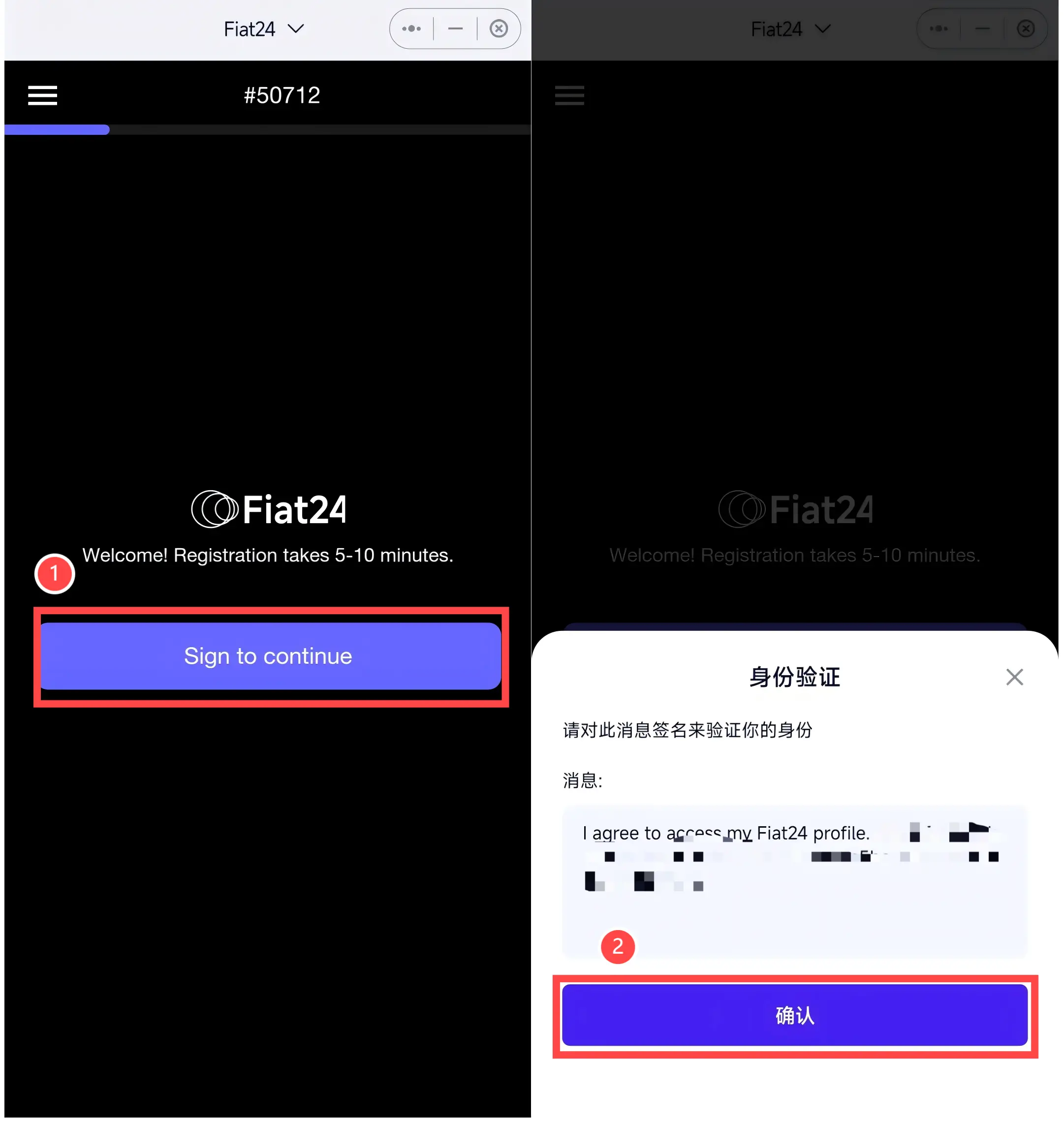
Click "Sign to continue," and then in the identity verification pop-up window, click "Confirm" to complete the wallet signature.
For the three options regarding address, ID, and GPS (turn on the phone's GPS location), all must be activated------From here, all subsequent buttons must be clicked to light up, then click "Continue" to enter the next page.

For the address option, light it up, then choose ID or passport for identity verification (Android users with NFC functionality can use ID, while Apple users are advised to use a passport; the following example uses an Android phone).

All four options for personal information must still be lit up, then click "Continue" to enter the next page.

For account purpose, it is recommended to check all options, then click "Next" to enter the next page.
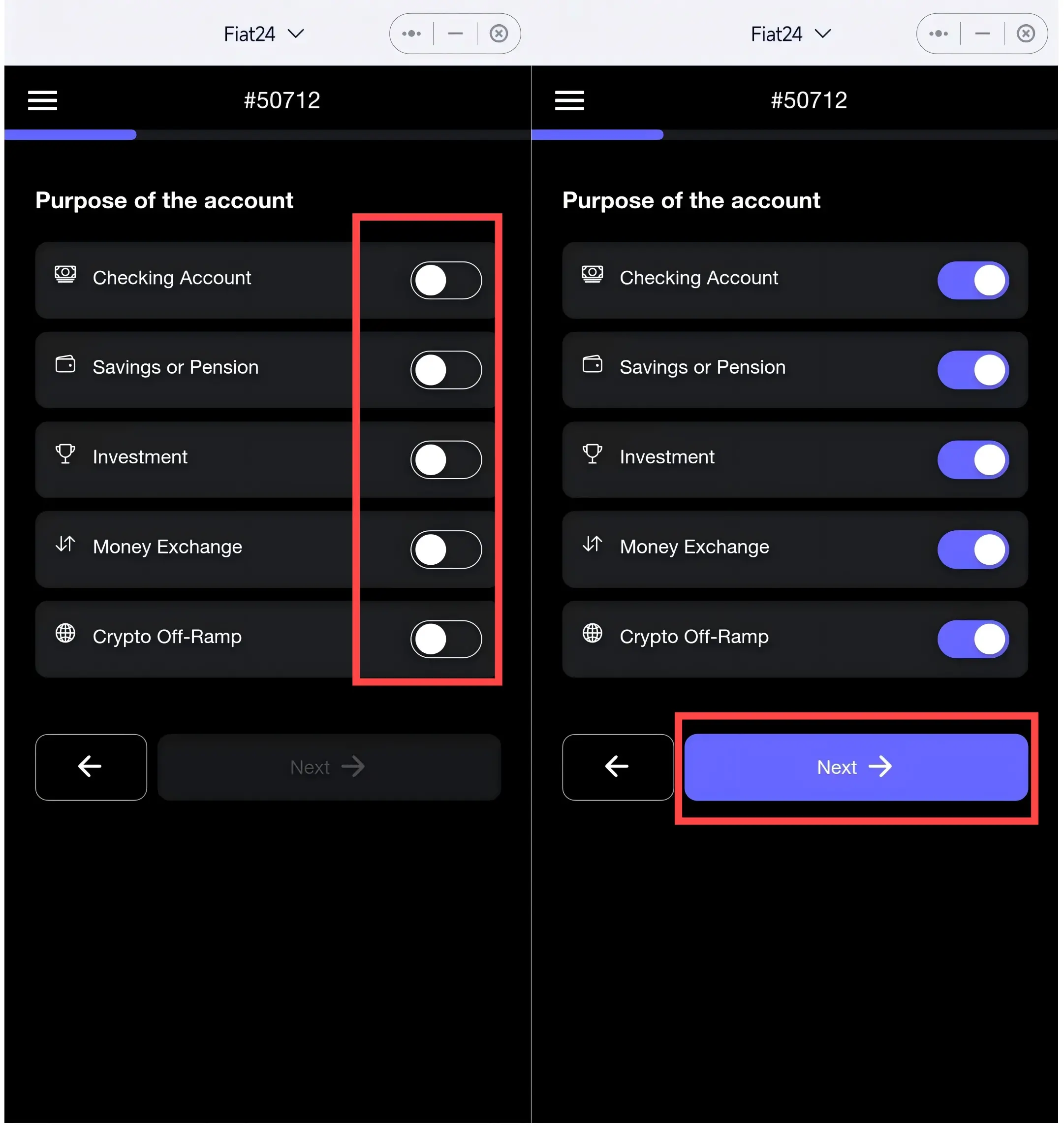
For personal risk assessment, it is advisable to fill in the source of income, income situation, etc., truthfully, and then click "Next"; on the informed consent page, light up the two options and then click "Next."

Next, you need to accept the email verification code to bind your email and make the final signature confirmation:
- First, enter your email address and click "Get Code" to obtain the verification code;
- After receiving the verification code, fill it in and click "Expired Signature, sign again";
- Then in the identity verification pop-up window, click "Confirm" to complete the wallet signature;
- After signing, click "Submit";
- In the identity verification pop-up window, click "Confirm" to complete the wallet signature;

Enter the ID verification page, light up the options, and then use an Android phone with NFC functionality to scan the QR code in WeChat to enter the verification mini-program.

First, place the ID at the back of the phone for scanning------Make sure to turn on the phone's NFC switch in advance, otherwise, it may prompt that the phone is not supported. Then perform facial recognition, and once passed, you will complete the identity verification and return to the SafePal APP's registration process. Click "Click when you finish it" to complete (for the official ID account opening video tutorial, see link).
Note: Some phones may not be able to enter the ReadID App to upload passports due to compatibility issues. You can visit the bank KYC website on a computer to obtain the KYC QR code, then use the ReadID App to scan the QR code to continue the verification.

Once Fiat 24 approves the review, the bank account will be successfully registered, and based on this, users in domestic regions can choose to apply for a card.
Note: During the closed beta period, newly opened bank accounts need to wait about a day before the Mastercard can be activated (the application entry will be received within 2-3 days at the latest after registration).
2. Applying for SafePal Mastercard
In the SafePal APP, on the "Bank" service page, click "Bank Card" to apply for your co-branded Mastercard. Note: To activate the Mastercard, ensure that there is at least 10 USD in the bank account.

After successful application, you can view the card information and payment settings for the Mastercard:
- Click the icon on the card number to enter the details page;
- Supports four currencies: USD/RMB/EUR/CHF, allowing you to freely open corresponding accounts based on your needs, for example, choosing RMB for domestic spending and USD or other currencies for overseas or international service subscriptions to reduce currency exchange fees;
- Click the "eye icon";
- In the identity verification pop-up window, click "Confirm" to complete the wallet signature;
- After authorization, you can click to view the full card number, expiration date, and CVV security code for binding to WeChat, Alipay, or for other payment scenarios (Note: Do not disclose the CVV security code to anyone);

Use the invitation code "244274" in the SafePal APP to participate in the closed beta. If you have any registration or usage issues, you can add V "kleene 18 bot" to reach the official support for easy communication and getting started smoothly.
3. SafePal Mastercard User Guide
1. Bank Account / Mastercard Recharge
SafePal bank accounts (NFT) and the deposited fiat------USD/RMB/EUR/CHF, are all based on the Arbitrum network, so users need to ensure that they have Arbitrum ETH in their wallets as Gas, and the stablecoin USDC for recharging must also be based on the Arbitrum network:
- Ensure sufficient Arbitrum ETH in the wallet: Since the recharge process requires transactions on the Arbitrum network, ensure that there is enough Arbitrum ETH in the wallet to pay for Gas fees. It is recommended to prepare at least 0.001 ETH to ensure the transaction is completed smoothly.
- Confirm that the USDC for recharge is based on the Arbitrum network: Ensure that the USDC you recharge is the version based on the Arbitrum network to avoid recharge failures or loss of funds;
With USDC already in the wallet, you can recharge cryptocurrency into the account, freely exchange it for USD/RMB/EUR/CHF:
- Click the "Recharge" button on the "Bank" page to enter the recharge operation interface;
- You will see options for the four supported currencies: USD, RMB, EUR, and CHF. Choose the corresponding currency type for recharge based on your needs;
- On the exchange page, you can see the real-time exchange rate and recharge fees (currently 100% refunded during the promotional period);
- Sign authorization and confirm the transaction again;
- After successful exchange, you will see the option for RMB;

2. Binding Alipay / WeChat
On the bank card binding page of Alipay and WeChat, enter the 16-digit Mastercard number along with the expiration date and CVV security code mentioned above to successfully bind.

3. Other Spending Scenarios
X, GPT, and APPLE, etc., all support adding this Mastercard as a payment method. Note: When paying with GPT, a Swiss VPN is required (it stipulates that payment can only be made in the issuing institution's location).
Additionally, the official statement indicates that brokers currently support Interactive Brokers and Charles Schwab (the author has not yet tested this), allowing for deposit and withdrawal transactions based on IBAN.
4. Initial User Experience and Actual Rates
As of December 20, after binding Alipay and WeChat in domestic regions, I conducted comprehensive tests in online scenarios and offline merchants:
- Online scenarios: After binding Alipay and WeChat, successful payments were made for food delivery on Meituan, shopping on Taobao, Pinduoduo, and JD.com, with a good experience;
- Offline scenarios: Payments can be made by scanning QR codes in supermarkets, restaurants, and personal collection codes;
The actual costs compared to the current mainstream crypto U cards are relatively low------Recharge fees are only 1% (long-term promotion, 100% refunded), with no small transaction fees. The best part is that since it supports RMB, compared to some cards that only settle in Singapore dollars (SGD) and USD, it can save up to 1% in currency exchange fees when used for domestic spending.
For example, on the day of testing, the SafePal exchange page provided a RMB exchange rate of 1 USDC ≈ 7.22 RMB, while the official RMB central parity rate that day was 7.19, the Bank of China's spot buying price was 7.28, and BN's actual withdrawal price was around 7.26. The actual loss was around 1%, far lower than the 2-3% or even higher actual rates of other crypto payment cards.
Even when settling in USD, the comprehensive exchange rate is still advantageous------with two corresponding amounts of 150 RMB (20.85) and 7 RMB (0.97), the corresponding exchange rates are 7.1942 and 7.2164.
Interestingly, as mentioned above, the USD/RMB/EUR/CHF in the SafePal bank account are all RWA tokens issued by Fiat Bank based on the Arbitrum network, so in fact, our balances and spending are fully transparent, ensuring that no third party can misappropriate or hold the funds.

More detailed rate tests and comparisons with current mainstream crypto U cards will be completed soon, so stay tuned.
 Risk warning
 Risk warning