



SafePal Full Series Comparison | Say Goodbye to USB Cable Dependency, "Mobile-First" Cold Wallet Full-Stack Strategy

 Daily transactions do not require a USB cable, driven by the app, a rare "mobile-first" architecture in the hardware wallet sector.
Written by: Tyler
Currently, what is the lowest barrier to entry for obtaining hardware wallet-level Crypto security?
In the hardware wallet market, users often need to strike a balance between "usability" and "cost-effectiveness." Established overseas brands like Ledger and Trezor have long been criticized for their user experience, while OneKey, which is more familiar to users in the Chinese-speaking region, has seen a decline in cost-effectiveness. Hardware wallets seem to be generally trapped in the industry dilemma of "security equals bulkiness."
Notably, as the earliest incubated hardware wallet project by Binance and currently the only hardware wallet project that has received investment from Binance and launched on Binance Launchpad, SafePal has lowered the entry barrier for hardware wallets to $49.9. At the same time, it has migrated high-frequency operations such as signing and authorization to the mobile end, using the USB interface only in low-frequency scenarios like firmware upgrades and charging, and has built a full-stack experience that includes hardware wallets (S1, S1 Pro, and X1), software wallets, browser extension wallets, and compliant banking services.
This article will focus on the full range of SafePal hardware wallets, combining practical experience and comprehensive comparisons to explore how SafePal uses a "mobile-first" approach to achieve zero-contact communication for daily transactions (authorization/signing), retain physical interfaces for firmware upgrades/charging, and find a breakthrough point in the game between "security" and "convenience," opening the door to "lightweight security" for ordinary users.
SafePal Hardware Wallet Family: S1, S1 Pro, X1
Currently, SafePal's hardware wallet product line includes three models: S1 ($49.99), S1 Pro ($89.99), and X1 ($69.99).
Among them, the S1 and S1 Pro use QR code interaction , pairing with the mobile SafePal wallet app through the camera's QR code scanning, achieving complete physical isolation; the X1 focuses on low-power Bluetooth connectivity , allowing pairing with the mobile app via Bluetooth, balancing convenience and security, making it more suitable for frequent operation by Degen users.
All three hardware wallets have completed audits and are open-source on GitHub, can set PIN and PassPhrase, and come with factory-installed anti-hacker self-destruct mechanisms, device anti-counterfeiting verification, and firmware tampering protection. They can be used in conjunction with the SafePal App and SafePal extension wallet, fully supporting iOS, Android, Windows, and MacOS, and covering over 200 public chains and all cryptocurrencies, NFTs, and smart contract asset management needs on those chains.
SafePal S1: The Most "Affordable" Entry-Level Hardware Wallet
As the first hardware wallet launched by SafePal, the biggest feature of the SafePal S1 is its "affordable and easy to use" nature, making it one of the most budget-friendly entry-level hardware wallet products currently on the market.
Currently, the official price of the S1 is only $49.9 (the prices mentioned in this article are the direct prices from the official website, not considering package deals or distribution channel discounts), which is among the highest cost-effective entry-level hardware wallets available—by comparison, OneKey Classic 1S is $99, Trezor Model One is $49, and Ledger Nano S Plus is about $86.
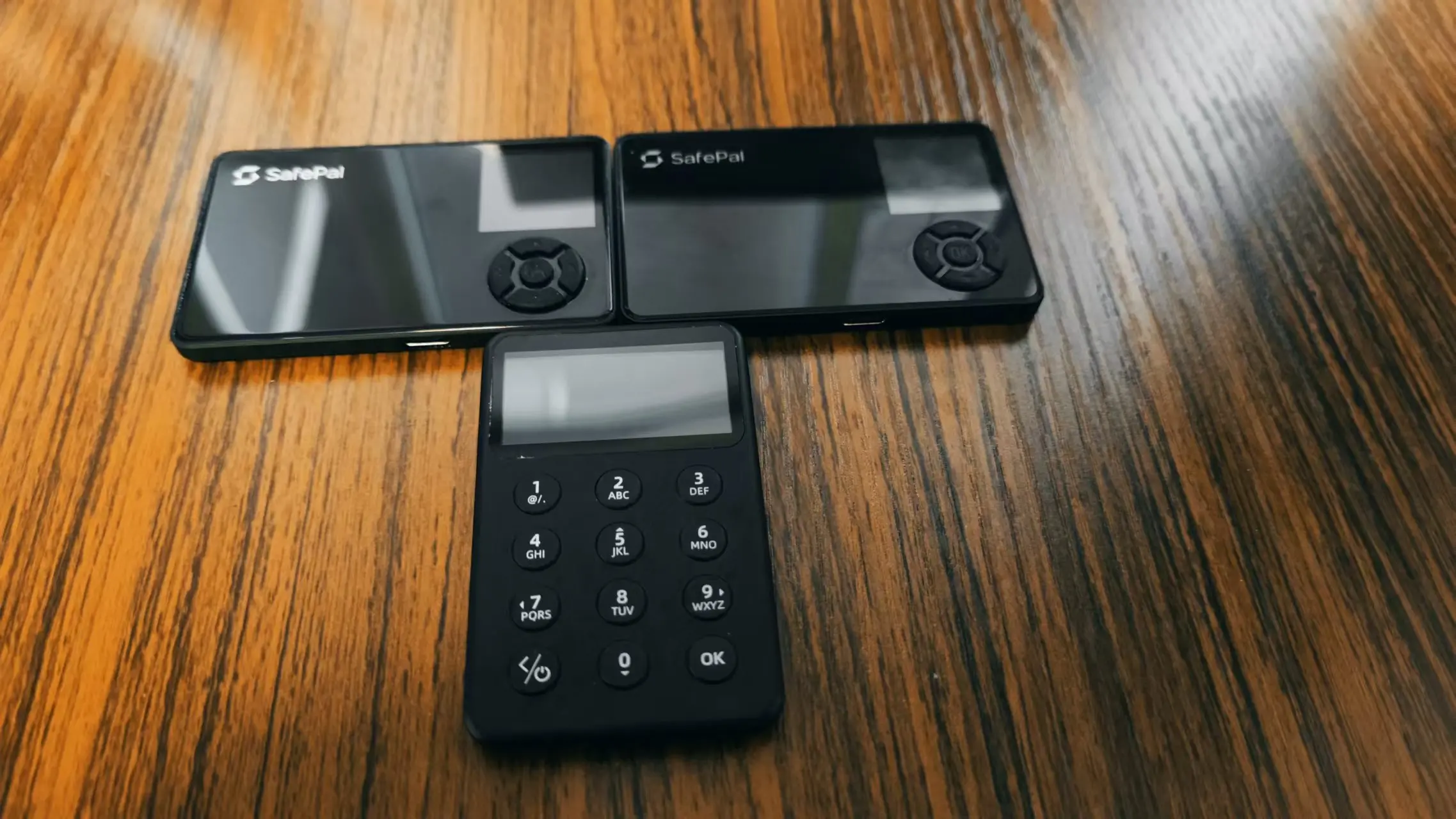
In terms of appearance, the S1 resembles early MP3 players, with dimensions comparable to a standard bank card in China, making it easy to carry (it fits perfectly into a wallet designed for bank cards). The configuration on both sides is quite simple:
On the front, the rightmost side features a color screen (displaying wallet information and QR codes) at the top and a directional key (for menu navigation) at the bottom;
On the back, the top right side is equipped with a camera for scanning QR codes when signing transactions;
On the right side of the device, the only button is the power button; at the bottom of the device, there is a Type C port (for charging/connecting devices);

Thus, the only means of communication between the S1 and the outside world is "screen display" and "camera scanning." Except for firmware updates and charging, it is almost completely physically isolated, requiring no wired connections, greatly reducing the risk of remote attacks, making it highly secure. Of course, this also means that the operation is relatively cumbersome, especially for users who require high-frequency operations:
In theory, every daily interaction requires the S1 and the mobile app to scan each other's QR codes in succession to complete offline signing for authorization or sending transactions.
From the actual holding experience, the S1 feels noticeably lightweight, with a strong plastic feel, and the material leans towards "pragmatism," being neither soft nor weak, with good pressure resistance.
At the same time, compared to some hardware wallets' slim designs, the S1 has a moderate thickness, making it more resistant to bending (as shown in the image below, from top to bottom are imToken imKey, OneKey Classic, and SafePal S1). I have not encountered the embarrassing situation of bending and damaging like the OneKey Classic during personal use…

Here is the process for initial activation and use:
1. Power on settings, create/recover wallet
Long press the power button on the right side until the screen lights up, entering the language selection interface, select "Simplified Chinese," then confirm the button prompts to enter the initialization page, click "Okay, let's get started," and you will enter the wallet setup page with two options:
"Create a new wallet": Offline generate and back up a new set of mnemonic words, with the option to choose 12, 18, or 24 words, then back up and verify to use normally;
"Recover an existing wallet": Enter the previously backed-up mnemonic words to recover the old wallet for normal use;

2. Set PIN code
After creating or recovering the wallet, you will enter the PIN code setup page, where you can enter a 6-digit, 8-digit, or other length PIN code, and then name the hardware wallet to complete the initial setup.

3. Mobile app pairing (QR code binding)
After setting up the hardware wallet, download and open the SafePal wallet app, click on the wallet name at the top of the app's homepage (as shown in the "Tyler-S0K#1" section), and enter the wallet management interface.
Next, in the wallet management interface, click the "Add Wallet" button, select the "Connect Hardware Wallet" option, and options for different models of SafePal hardware wallets (such as S1, X1, S1 Pro) will appear. Select the corresponding hardware wallet model (the image shows S1).

Then, according to the prompts, use the S1 camera to scan the QR code displayed on the mobile screen.
 After the S1 scans the code, select "Confirm" to bind this wallet, and 13 QR code images containing private key signature information will appear alternately.
At this point, return to the app and use the scanning function to scan the QR code displayed on the S1, holding it for a while until all 13 codes have been scanned to complete the binding and pairing of the hardware wallet with the mobile app.

Once bound, the SafePal app can sync the addresses and asset information within the X1 wallet, allowing users to directly view asset balances on various chains, such as BTC, ETH, BNB, etc., and perform subsequent transfers, authorizations, and other on-chain interactions.
4. Signing/authorization for daily transactions
After successful pairing, return to the app homepage, and you can perform various on-chain operations such as transfers and payments with the connected hardware wallet through the mobile app. For authorization/signing steps, confirmation must be done on the S1------information is transmitted via QR code to complete offline signing.
Taking a daily transfer operation as an example:
Initiate transfer operation: In the transfer interface, select the payment wallet (the account corresponding to the connected hardware wallet), fill in the transfer currency (e.g., BNB), recipient address, and transfer amount, then click "Next";
Confirm transaction details: A transfer confirmation interface will pop up, displaying the payment address, recipient address, transfer amount, miner fee, and other detailed information. Double-check the information, and if everything is correct, click "Transfer Out";
Trigger biometric verification: The system will pop up a fingerprint verification window (if fingerprint payment is enabled), verify the fingerprint; otherwise, enter the PIN code for the app;
Generate transaction QR code: After verification, the app will generate a QR code containing the complete transaction information (as shown in the last image), while displaying a verification code for the user to double-check. This QR code is the transaction data that needs to be scanned by the hardware wallet for offline signing;

At this point, using the S1 hardware wallet, scan the QR code displayed on the mobile device. The hardware wallet screen will generate a verification page, allowing the user to verify key transaction information (transfer amount, address, miner fee, etc.). After confirming everything is correct, click "OK" and enter the previously set PIN code, which will then generate two alternating QR codes containing private key signature information on the S1 screen.

Finally, return to the app, show the QR code on the S1 screen to the mobile app for scanning to complete the signing and broadcast the transaction on-chain.

From the above S1 + wallet app operation process, it can be seen that during daily transactions, users can pair the SafePal hardware wallet with the app, and the two communicate via QR codes, with the S1 remaining completely offline throughout the process, emphasizing "extreme isolation, extreme security," suitable for long-term "holding coins" or scenarios where frequent on-chain interactions are not needed.
In summary, the S1 achieves extreme security isolation through QR code design, making it very suitable for users who are new to cold wallets and wish to "safely hold coins" at a low cost— for less than $50, users can securely buy and hold hundreds of mainstream public chain crypto assets. Of course, the QR code isolation design also makes its signing process relatively cumbersome, making it unsuitable for high-frequency user needs in daily interactions.
SafePal S1 Pro: A Comprehensive Upgrade of the S1
As an iterative upgrade of the SafePal S1 (with the price rising from $49.9 to $89.99), the S1 Pro has a similar appearance and size to the S1 but significantly excels in detail refinement and user experience.
First, there is a comprehensive upgrade in materials, from S1's ABS + PVC to aluminum alloy + tempered glass, with the battery capacity expanded from 400 mAh to 500 mAh. The overall body is lighter and more compact, with rounded corners enhancing grip comfort.
The surface material removes the noticeable "plastic feel" of the S1, giving it a more ceramic-like texture and firmness, making the overall contour more hand-friendly, resulting in a "smooth" rather than "rough" feel for the S1 Pro, achieving a perceptible upgrade in shell quality without sacrificing hardness and pressure resistance.
Secondly, the structural optimization of the camera position—the S1 Pro moves the rear camera from the top right corner of the S1 to a centered layout, not only making the aperture smaller and the appearance more coordinated but also solving the issue of needing to frequently adjust angles when scanning QR codes for signing due to the separation of the screen and camera position on the S1, significantly improving QR code recognition efficiency.
 The initial activation and use process of the S1 Pro is the same as that of the S1, so I won't elaborate further.
Of course, like the S1, the S1 Pro continues the "high security, slightly cumbersome operation" characteristic brought by QR code signing, so its application scenarios are similar to the S1, making it more suitable for users who prioritize asset security storage and holding needs. For high-frequency trading users, its operation process still has certain limitations.
SafePal X1: Bluetooth Model, A Tool for "Cross-Device/Multiple Accounts" Switching
SafePal X1 is the first Bluetooth hardware wallet launched by SafePal ($69.9), slightly narrower than a standard bank card, making it compact. Compared to the S1 and S1 Pro, the screen size has been upgraded from 1.3 inches to 1.8 inches, and it is equipped with a 12-key physical keypad (10-digit keypad + 2 function keys), making it more intuitive and convenient for entering PIN codes and switching between different pages.
Unlike the QR code offline interaction mode of the S1 and S1 Pro, since the X1 connects via Bluetooth, users can quickly switch between multiple devices, achieving efficient asset management and transaction signing, suitable for users frequently operating with multiple accounts and devices:
Users can manage daily transactions on their phones, conduct asset analysis on tablets, and perform large transfers on computers, with all operations quickly completed via X1 for signing without repeatedly plugging in devices or scanning QR codes, enhancing operational efficiency.

Here is the process for initial activation and use:
1. Power on settings, create/recover wallet
Long press the power button on the lower left corner of the X1 to power it on. Once the screen lights up, enter the language selection interface, use the numeric keys to select "Simplified Chinese," and press "OK" to confirm.
Like the S1 and S1 Pro, you will enter the wallet setup page with two options:
"Create a new wallet": Offline generate and back up a new set of mnemonic words, with the option to choose 12, 18, or 24 words, then back up and verify to use normally;
"Recover an existing wallet": Enter the previously backed-up mnemonic words to recover the old wallet for normal use;

2. Set PIN code
After creating or recovering the wallet, you will enter the PIN code setup page, where you can enter a 6-digit, 8-digit, or other length PIN code, and then name the hardware wallet to complete the initial setup.

3. Mobile app pairing (Bluetooth binding)
After setting up the hardware wallet, download and open the SafePal wallet app, click on the wallet name at the top of the app's homepage (as shown in the "Tyler-S0K#1" section), and enter the wallet management interface.
Next, in the wallet management interface, click the "Add Wallet" button, select the "Connect Hardware Wallet" option, and options for different models of SafePal hardware wallets (such as S1, X1, S1 Pro) will appear. Select the corresponding hardware wallet model (the image shows X1).

With Bluetooth on your phone, the app will automatically start searching for nearby Bluetooth devices. When the X1 is powered on and Bluetooth is enabled, it will automatically search for and match the X1 hardware wallet ------ as shown in the image, the device name like "SafePal X1-830B" will appear in the available devices section of the wallet app.

After clicking the corresponding device name, the app will automatically initiate a pairing request. At the same time, enter the PIN code on the X1 screen to confirm the pairing, and the user only needs to use the "OK" key on the physical keypad to complete the confirmation, thus completing the wallet binding process on the hardware device.

Once bound, the SafePal app can sync the addresses and asset information within the X1 wallet, allowing users to directly view asset balances on various chains, such as BTC, ETH, BNB, etc., and perform subsequent transfers, authorizations, and other on-chain interactions.
4. Signing/authorization for daily transactions
After successful pairing, users can perform various on-chain operations such as transfers and authorizations with the connected X1 Bluetooth hardware wallet through the SafePal app, without needing to scan codes throughout the process; all interaction data will be automatically encrypted and transmitted via Bluetooth, with confirmations and signatures displayed on the X1 screen.
Taking a daily transfer operation as an example, here is the complete Bluetooth signing process:
Initiate transfer operation: In the SafePal app, select the payment wallet (the account bound to X1), fill in the currency (e.g., BNB), recipient address, and amount, then click "Next";
Confirm transaction details: The app will pop up a transaction confirmation interface, displaying the payment address, recipient address, transfer amount, and miner fee, etc. After carefully verifying the information, click "Transfer Out" to continue;
Trigger biometric verification: If fingerprint payment is enabled, the system will pop up a fingerprint recognition box; if not enabled, you will need to enter the SafePal app's PIN code;
Bluetooth push signing request: After identity verification, the transaction data will be pushed to the X1 hardware wallet via Bluetooth. At this point, the X1 screen will automatically pop up a transaction confirmation interface, displaying core information (transfer amount, address, gas fee, etc.), ensuring the user verifies the information again;
After confirming the information is correct, use the X1 physical keys to complete the PIN code input and click "OK" to sign the transaction. Once signed, the X1 will automatically send the signed data back to the app via Bluetooth, and the app will automatically initiate the transaction broadcast, entering the on-chain confirmation process.
After the transaction is completed, wait for the blockchain network to confirm the transaction, and you can check the transaction status and progress on the app.

Overall, the SafePal X1 Bluetooth hardware wallet provides users with a "second-level response experience" for completing high-frequency operations without frequent scanning or wired transmission—transaction requests are pushed via Bluetooth encryption, and users only need to complete PIN input and button confirmation on the X1 physical device to achieve offline signing, with the private key never touching the internet.
Especially by replacing QR codes with Bluetooth, the X1 not only simplifies the entire signing process but also effectively enhances the smoothness of use, making it particularly suitable for frequent trading and cross-device switching by Degen users. Compared to the S1 and S1 Pro, its greatest advantage lies in its native adaptation to "high-frequency, multi-end, multi-account" operations:
Seamless cross-device operations: The X1 can flexibly switch between multiple terminals such as phones, tablets, and laptops, allowing users to manage daily transactions on their phones, conduct DEX operations or large fund allocations on PCs, with one-click authorization via Bluetooth, eliminating the need for repeated plugging or scanning, greatly enhancing efficiency;
Parallel management of multiple accounts: The SafePal app supports adding multiple wallet accounts, and the X1 can quickly pair with different accounts via Bluetooth without needing to re-import mnemonic words or reinitialize the device, allowing for quick account switching through Bluetooth for corresponding asset management and transaction signing, adapting to advanced users' high-efficiency needs in multi-chain and multi-wallet asset management scenarios;
This makes the X1 a rare cold wallet solution among similar products that is truly suitable for "multiple accounts + multiple devices + high-frequency interactions."
In terms of security hardware standards, SafePal X1 is gradually completing the upgrade from the original CC EAL5+ to CC EAL6+ security chips, achieving the same high-security standards as the S1/S1 Pro. This level of security certification is commonly used in military, financial, and other scenarios with high data protection requirements, ensuring that private keys are always securely stored within an independent chip and cannot be exported or cracked.

Other Accessories
To further enhance the security and convenience of asset backups, SafePal has also launched two practical accessories: the SafePal Cypher metal mnemonic board and a protective case specifically for hardware wallets, priced at $44.99 and $9.9, respectively.
The SafePal Cypher is a stainless steel metal plate designed for long-term secure backup of mnemonic words, following the BIP39 mnemonic standard and supporting the storage of 12, 18, or 24 mnemonic words. Its greatest advantage lies in its fire resistance, waterproofing, and corrosion resistance, making it more suitable for long-term storage.
After all, compared to paper backups that are prone to moisture, burning, or loss, the Cypher is made of industrial-grade stainless steel, with a melting point of up to 1398°C, far exceeding the average temperature of a typical house fire (about 900°C) (similar aluminum alloy products on the market have a melting point of about 650°C, posing a risk of failure in extreme conditions).
Additionally, it has good moisture, rust, and acid-base resistance, allowing it to be stored long-term without deformation or damage even in harsh environments, and it is impact-resistant and wear-resistant. The high-strength steel ensures stability and reliability in scenarios involving drops or impacts. Furthermore, its overall size is slightly larger than the S1/S1 Pro, making it easy to carry and store.
In short, the SafePal Cypher is a truly meaningful cold backup solution for "decades of backup planning," particularly suitable for users who prioritize long-term security in holding large amounts of cryptocurrency.

The protective case launched by SafePal is specifically designed for hardware wallets, featuring flexible and wear-resistant materials and a snug fit, effectively preventing the device from scratches and impacts during transport, making it very suitable for users who carry it around or travel frequently.
Overall, if you are new to the Crypto world and looking for an affordable and secure option for holding coins, especially if you primarily intend to hold assets long-term (HODL), do not require frequent on-chain interactions, prefer a "completely offline, fully isolated" asset isolation solution, and are price-sensitive, then a cold wallet combination based on SafePal S1 + Cypher + case is an excellent choice that is both economical and reliable in the current market (see here).
"Mobile-First" Full-Stack Architecture Design
As mentioned earlier, unlike most traditional hardware wallets that rely on USB connections to PCs, SafePal's S1, S1 Pro, and X1 hardware wallets have built a complete "mobile-first" interaction system centered around the SafePal App since their inception, forming a more unique cold wallet interaction mode:
S1 / S1 Pro: Achieve offline communication and signing with the app by scanning QR codes;
X1: Automatically connect to the app via Bluetooth for seamless signing;
Extension wallet: Authorization requests initiated by the app (the extension also supports mnemonic word import, maintaining a user experience similar to MetaMask), enabling multi-end connectivity.
This design, compared to PC wired connections, is closer to the experience of logging into the desktop version via WeChat QR code: Plugin initiates request ➝ App receives request ➝ Hardware wallet completes signing ➝ Data returned on-chain, meaning the transaction process is both secure and flexible, with the private key never leaving the hardware device and not being directly exposed to the online environment.

This architecture is also completely different from the interconnection mode of hardware wallets like OneKey in scenarios involving PC extension wallets. Taking the most typical DeFi operation scenario as an example:
- Traditional mode: PC wallet performs operations → wakes up hardware device via USB → hardware device physically confirms → USB returns data;
- SafePal architecture: PC wallet performs operations → mobile app receives push request → S1/S1 Pro scans QR code/X1 Bluetooth physically confirms → encrypted channel returns data;
This effectively constructs a three-layer architecture of "mobile app as core + hardware security layer + extension wallet," where when a user initiates a transaction in the plugin wallet on a PC device, the SafePal app will instantly receive the push request stream, and after the hardware wallet completes the off-chain signing, the data is returned to the plugin.
This retains the operational inertia of the plugin ecosystem while achieving hardware-level security isolation through the mobile end. I believe this "compatible but not dependent" design philosophy is also the core advantage of the "mobile-first" full-stack architecture, fundamentally transforming the hardware wallet from an "independent device" into a "security module of the mobile ecosystem," realizing that the SafePal App is a super application for secure transactions, asset management, and on-chain exploration:
Using the mobile app as the true center of on-chain interactions, while the PC end only serves as an information display and operational assistance role, and the hardware end focuses on authorization and signing, fundamentally enhancing the smoothness of use and security redundancy during multi-terminal collaboration.
After all, looking at the development history of the internet era, future Web3 applications and Crypto security devices will likely reconstruct interaction logic around the mobile end.
Conclusion
Hardware wallet-level Crypto security services should become an inclusive public product of Web3.
Objectively speaking, the current entry-level product SafePal S1 is priced at only $49.99, making it the most user-friendly entry-level hardware wallet on the market, a "hardware wallet that everyone can afford."
From the perspective of user experience, with the popularization of mobile wallet experiences, SafePal's interaction mode of "centered on mobile app + hardware end QR code/Bluetooth signing" is also expected to gradually become the mainstream paradigm of Web3 wallet development: the PC end serves as the operating interface, while transaction authorization and signing are completed by linking the mobile app with the hardware wallet, truly achieving integrated asset management across devices and scenarios.
From a security logic standpoint, future hardware wallets will no longer be a single device but a cross-terminal encrypted asset management solution centered around the app. Moving forward, we look forward to more variables in the hardware wallet track.
 Risk warning Risk warning
Popular articles