


Understanding the Full Process of BTTC Cross-Chain in One Article
 Zero-threshold cross-chain practice, a step-by-step guide to using BTTC to achieve free circulation of assets between TRON, Ethereum, and BNB Chain.
In today's multi-chain Web3 ecosystem, achieving the free flow of assets and data is key to building a truly open internet. As a high-performance scaling solution specifically designed to address inter-chain interoperability, BitTorrent Chain (BTTC) has become an indispensable infrastructure within the TRON ecosystem, providing critical support for decentralized networks through its groundbreaking cross-chain architecture.
As of 2025, the BTTC ecosystem has attracted over 14 million addresses, with the network having processed more than 290 million transactions and the total number of smart contracts deployed exceeding 7.6 million. The daily average transaction volume and Gas consumption on-chain continue to rise, fully demonstrating the network's activity, strong growth momentum, and widespread application as an underlying support platform. This market-validated solution is continuously unleashing the infinite potential of the TRON ecosystem to connect the entire chain world.
At the same time, as the TRON ecosystem continues to grow, BTTC is committed to creating core value for users by providing a seamless and low-cost channel for interaction with external chain assets. By securely transferring assets to the BTTC network and then sending them to the target chain (supporting interoperability among TRON/Ethereum/BNB Chain), users can complete secure asset transfers, with the core relying on the precise collaboration of bi-directional verification and smart contracts:
Asset Transfer (Sending Network -> BTTC): Transfer assets from the source network to the BTTC network.
Cross-Chain Bridging (BTTC -> Receiving Network): Transfer assets from the BTTC network to the target network.
Final Receipt (On Receiving Network): Receive and use assets on the target network.
BitTorrent Bridge currently supports cross-chain transfers of BTT, TRX, JST, NFT, SUN, USDD, and WIN, and offers three modes of cross-chain asset transfer to flexibly meet different scenario needs:
Manual Receipt: The full amount of cross-chain assets arrives, suitable for users familiar with target chain operations. Note: The receiving address on the target chain must have sufficient funds to pay Gas fees to complete the final receipt operation.
Automatic Receipt: Achieve "one-click arrival" for ultimate convenience. A decentralized Relayer agent receives the assets and pays the Gas fees, with service costs automatically deducted from the cross-chain assets.
Automatic Receipt + Gas Top-Up: Participate in the on-chain ecosystem immediately after the cross-chain is completed. The Relayer agent receives the assets and pays the Gas fees, while also transferring a small amount of native Gas tokens of the target chain to the receiving address for subsequent operations, with service costs similarly deducted from the cross-chain assets.
This article will take the cross-chain transfer from TRON Network to BSC Network as an example to detail the entire process under the three cross-chain modes.
1. Fill in Basic Information
Connect your wallet, and in the "From" and "To" dropdown menus on the operation interface, select TRON Network and BSC Network as the source and target networks, respectively.
The receiving address will be automatically filled with the currently connected wallet address. If you need to specify a different receiving address, click "Use another address" and enter the address. Be sure to carefully verify the address, as transactions cannot be revoked or modified once initiated.
In the "Sending Amount" field, select the token and enter the transfer amount. The system will display the estimated amount to be received in real-time.

2. Manual Receipt Mode
- Start Bridging (TRON -> BTTC)
Switch to "Manual Receive" in the receiving mode, click "Bridge," and check the estimated receiving time and required Gas fees on the interaction page. Confirm that everything is correct before authorizing.

- Assets Arrive at BTTC, Execute Cross-Chain (BTTC -> BSC)
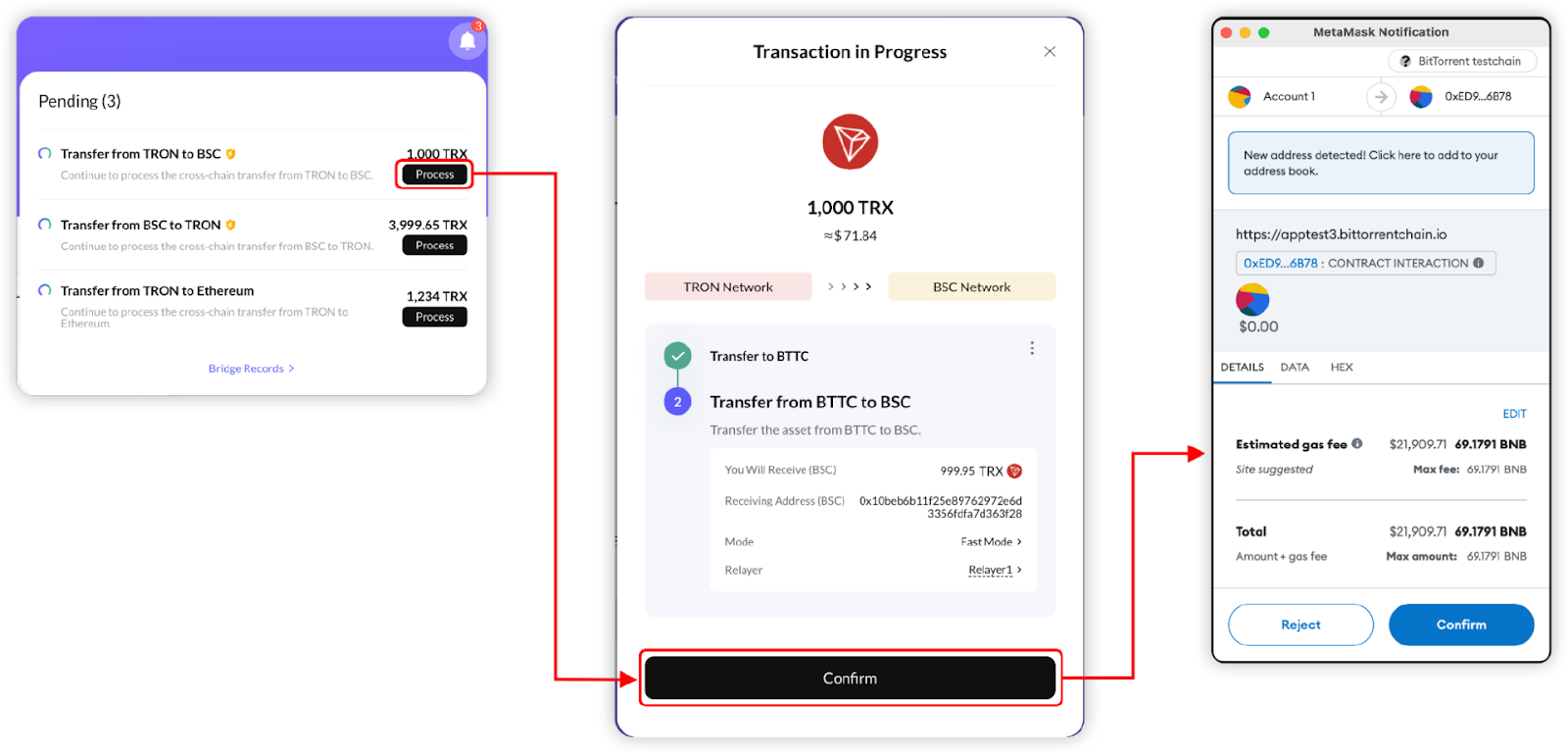
When the assets arrive at the BTTC receiving address, you can see the transaction in the "Notifications" section at the top right of the page. Click "Process" to view transaction details. After confirming the transaction information, authorize your wallet to proceed with the cross-chain on the BTTC Network.
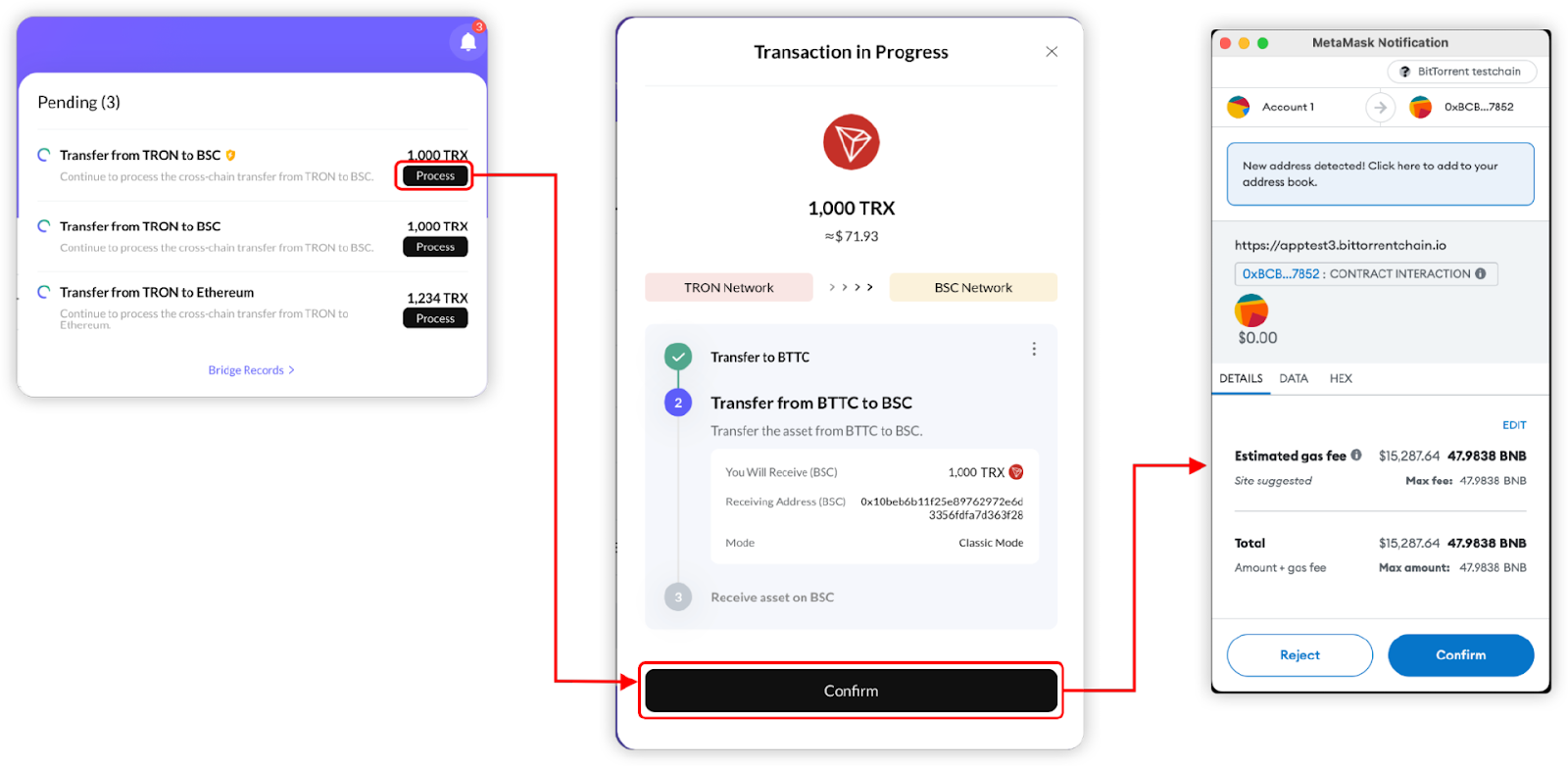
The entire interaction will fully display the estimated arrival time and cross-chain fees. Under normal circumstances, this process takes about 30 minutes, but if the network is congested, it may take longer (the entire process is affected by the real-time status of the network).

- Asset Receipt
After the transaction is completed, the "Notifications" area at the top right of the page will display relevant prompts. Click the "Receive" button in the prompt and confirm the signature in your wallet to complete the asset receipt.

3. Automatic Receipt Mode
The automatic receipt mode supports most tokens on BTTC. In this mode, users only need to complete the first two transactions (transfer assets from the sending network to BTTC, transfer assets from BTTC to the receiving network), and the Relayer will automatically execute the third transaction.
- Start Bridging (TRON -> BTTC)
After filling in the basic information, switch to "Auto Receive" in the receiving mode. The platform will display real-time service quotes from different Relayers. You can check the estimated receiving time and required Gas fees on the interaction page, and authorize after confirming everything is correct.

- Assets Arrive at BTTC, Execute Cross-Chain (BTTC -> BSC)
When the assets arrive at the BTTC receiving address, check the transaction details on the "Process" page. After confirming the transaction information, authorize your wallet to proceed with the cross-chain. The cross-chain process usually takes about 30 minutes (affected by network congestion).
- Asset Receipt
Next, the Relayer will automatically complete the receipt operation on the target chain. Users do not need to perform any additional Receive operations, and the assets will automatically appear at the target chain address after deducting the service fee.
4. Automatic Receipt + Gas Top-Up
Similar to automatic receipt, in this mode, users only need to complete the first two transactions (transfer assets from the sending network to BTTC, transfer assets from BTTC to the receiving network).
- Start Bridging (TRON -> BTTC)
After filling in the basic information, switch to "Auto Receive + Gas Top Up" in the receiving mode and select a suitable Relayer. Check the estimated receiving time and required Gas fees on the interaction page, and authorize for cross-chain after confirming everything is correct.

- Assets Arrive at BTTC, Execute Cross-Chain (BTTC -> BSC)
After the assets arrive, you can check the transaction details on the "Process" page. After confirming everything is correct, authorize your wallet on the BTTC Network to initiate the transaction, transferring assets from BTTC to BSC. The cross-chain process usually takes about 30 minutes (affected by network congestion).

- Asset Receipt
The Relayer will automatically complete the receipt operation on the target chain, and the assets will automatically appear at the target chain address after deducting the service fee. Additionally, the receiving address will also receive a small amount of native Gas tokens from the target chain for easy participation in the on-chain ecosystem.
5. Transaction Record Inquiry
All cross-chain transaction records can be viewed on the [Bridge Records] page, which is clear and transparent.

Master the core capability of freely transferring assets in the multi-chain era with BTTC. Experience it now: log in to the official website (https://app.bt.io/bridge) and start your first cross-chain journey using tokens like BTT, TRX, USDD, and join the trillion-level liquidity network that unleashes the potential of the TRON ecosystem.
 Risk warning Risk warning